FMEA Template: The Right Format for AIAG & VDA Compliance
Why Most FMEA Templates Are Wrong
If you search for an FMEA template or "FMEA Excel template," you'll quickly find dozens of downloadable files. The problem is that many of them are based on an outdated methodology.
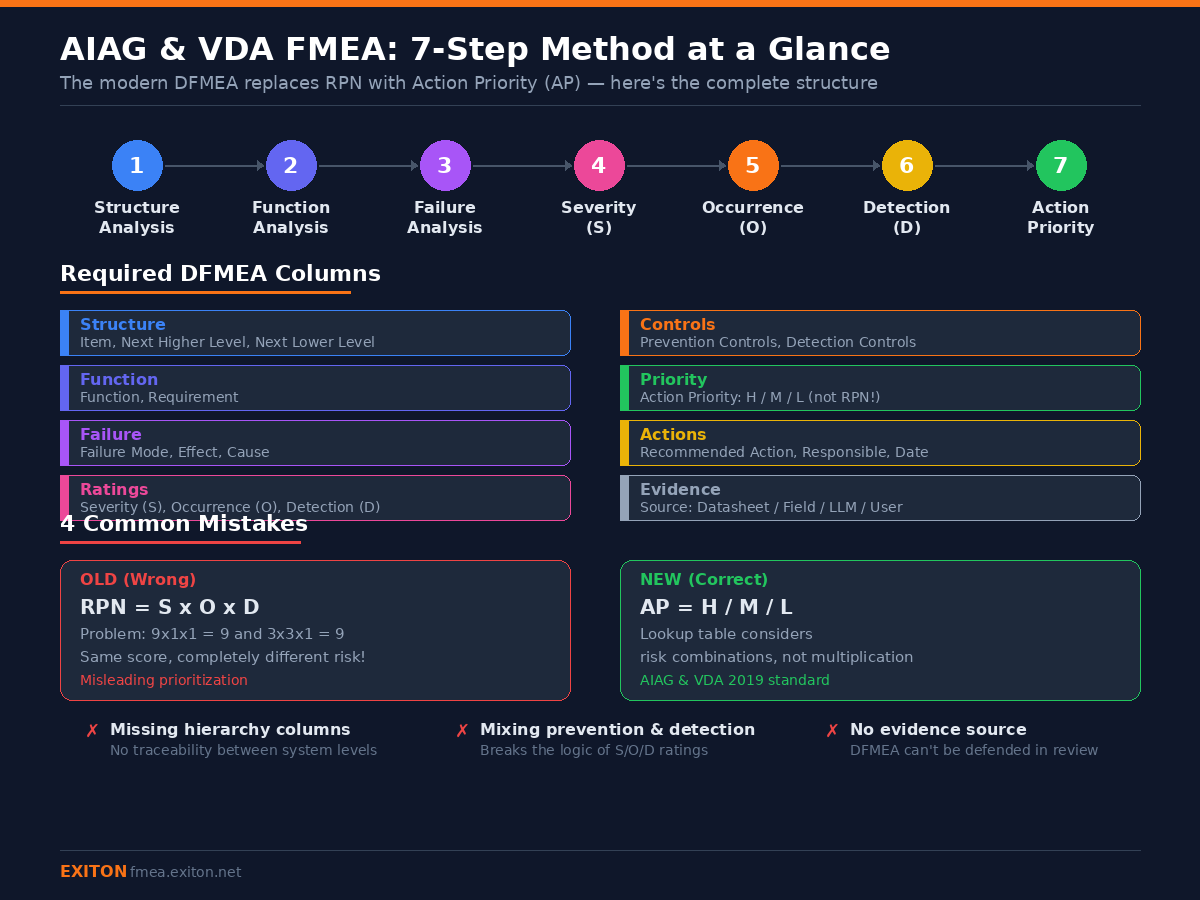
Older templates still use RPN (Risk Priority Number) — calculated as Severity × Occurrence × Detection. This approach was common before 2019, but it is no longer aligned with current industry standards.
The AIAG & VDA FMEA Handbook (1st Edition, 2019) replaced RPN with Action Priority (AP). Instead of a simple multiplication, AP is determined using a lookup table based on the combination of Severity (S), Occurrence (O), and Detection (D).
This change reflects a key insight: Risk is not linear, and not all combinations of S/O/D should be treated equally.
In addition, the modern standard introduces a 7-step structured approach:
- Structure Analysis
- Function Analysis
- Failure Analysis
- Failure Effects
- Failure Causes
- Controls (Prevention and Detection)
- Optimization
Many free templates ignore this structure entirely, which leads to inconsistent and incomplete analyses.
Required Columns in an AIAG & VDA Compliant DFMEA Format
An AIAG & VDA compliant DFMEA format is not just a spreadsheet — it reflects the full 7-step logic.
Step 1 — Structure Analysis
The structure analysis defines how the system is decomposed. Typical columns: Item (component or system element), Next Higher Level, Next Lower Level. This establishes hierarchy — critical for traceability.
Step 2 — Function Analysis
Each item must have a clearly defined function. Columns: Function, Requirement (performance expectation). Without this step, failure modes become guesswork.
Step 3 — Failure Analysis
Columns: Failure Mode, Failure Effect, Failure Cause. Each level must be clearly separated: Effect = what happens at system level, Cause = why it happens at component level.
Step 4 — Severity (S)
Severity reflects the impact of the failure effect. Scale: 1–10, based on impact (safety, functionality, compliance). Important: Severity is evaluated at the effect level, not the cause.
Step 5 — Occurrence (O) + Prevention Controls
Occurrence estimates how often the failure cause happens. Columns: Occurrence (1–10), Current Prevention Controls. Prevention controls are design actions that reduce the likelihood of the cause.
Step 6 — Detection (D)
Detection reflects how likely the failure is detected before it reaches the customer. Columns: Detection (1–10), Current Detection Controls (tests, monitoring, diagnostics).
Step 7 — Action Priority (AP)
Instead of RPN, AIAG & VDA uses Action Priority (H / M / L) based on the combination of S, O, and D ratings per the AIAG & VDA table. The exact table is defined in the handbook and should be referenced there.
Optimization Actions
Final columns: Recommended Action, Responsible Person, Target Completion Date, Status. This is where DFMEA becomes actionable — not just analysis.
Common AIAG VDA FMEA Format Mistakes
- Using RPN Instead of AP — misleading prioritization
- Missing Hierarchy Columns (Next Higher/Lower Level) — lose traceability
- Mixing Prevention and Detection Controls — breaks S/O/D logic
- No Evidence Source — DFMEA becomes hard to defend in reviews
Free vs Paid FMEA Templates — What You Actually Need
Free Templates: Often outdated (RPN-based), no validation, no structure enforcement. Good for learning, risky for real projects.
Enterprise Tools (e.g., APIS IQ): Fully compliant, TÜV-certified, expensive ($3,000+/seat). Best for large organizations.
Practical Middle Ground: Most teams need correct structure, reasonable cost, fast iteration.
Skip the Template — Generate DFMEA Automatically
Instead of maintaining templates manually, another approach is to generate DFMEA directly from design data.
EXITON FMEA reads your KiCad schematic and generates an AIAG & VDA compliant DFMEA worksheet. 15 component categories, built-in quality lint checks, structured output aligned with the 7-step method, no manual Excel formatting.
Try EXITON FMEA — Free for 30 Days
Generate AIAG & VDA compliant DFMEA from your KiCad schematic. No credit card required.
Download Free Trial