Manual FMEA vs Automated: How Much Time Are You Wasting?
The Manual FMEA Process (and Where Time Goes)
If you've ever created a DFMEA manually, you already know: It's not conceptually difficult — it's just time-consuming.
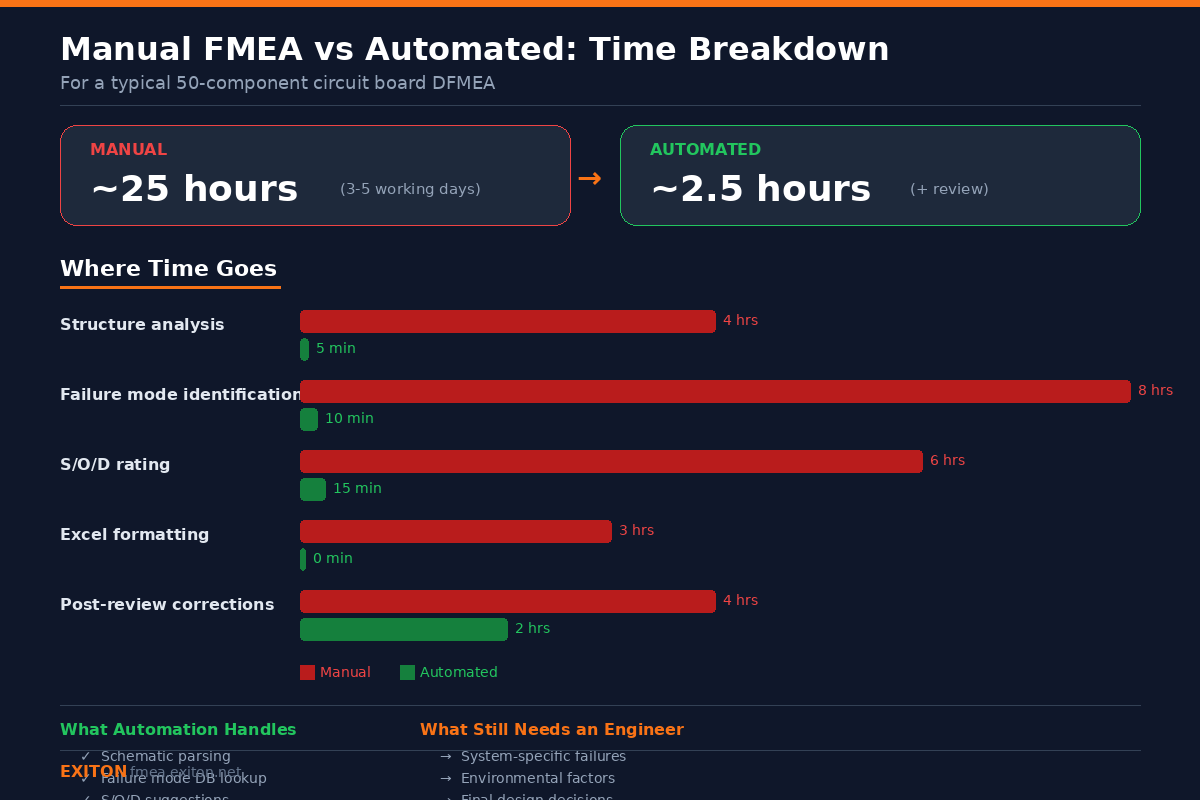
For a typical circuit with ~50 components, a DFMEA can take 3–5 working days (~25 hours).
Here's where that time goes:
- Cross-referencing schematic and BOM: ~4 hours
- Identifying failure modes (datasheets, prior projects): ~8 hours
- Assigning S/O/D ratings: ~6 hours
- Formatting in Excel: ~3 hours
- Post-review corrections: ~4 hours
And after all that, you still hear in the review meeting: "Are you sure nothing is missing?"
Where Automated FMEA Software Actually Helps
FMEA automation tools don't replace engineering — they remove repetitive work.
Structure Analysis
Parsing the schematic automatically extracts components, connections, hierarchy. Eliminates manual transcription.
Failure Mode Identification
Use a failure mode database, map by component category. Important: This is not LLM hallucination — it's structured lookup.
S/O/D Rating Support
Automation can assist by suggesting values, providing confidence scores, showing reasoning. The engineer still decides — but faster.
Excel Formatting
Formatting a DFMEA sheet manually is pure overhead. Automation generates AIAG & VDA compliant format instantly, eliminates formatting errors.
Quality Lint
Detect missing fields, catch inconsistent ratings, highlight structural issues. Typical implementations include 10–15 validation rules.
What Automation Can't Do (Important)
Automation has clear limits. It cannot replace engineering judgment.
Not handled:
- System-specific failure modes
- Environmental failure rates
- Organization-specific occurrence data
- Final design decisions
- Cross-functional design reviews
Automation produces: A structured draft — not a finished document.
Time Comparison: Manual vs Automated FMEA
Here's where automation saves the most time:
| Task | Manual | With Automation |
|---|---|---|
| Structure analysis | 4 hours | 5 minutes |
| Failure mode identification | 8 hours | 10 minutes |
| S/O/D rating | 6 hours | 15 minutes |
| Excel formatting | 3 hours | 0 minutes |
| Post-review corrections | 4 hours | 2 hours |
| Total | ~25 hours (3 days) | ~2.5 hours + review |
But Isn't AI-Generated FMEA Dangerous?
This is a valid concern. LLMs can generate plausible but incorrect content.
A safer approach: Use structured databases (not free generation), track evidence sources, attach confidence levels, require human validation.
In practice: Every row should have an Evidence Source, ratings should include confidence + rationale, output should be treated as a draft.
What About Existing FMEA Tools?
Enterprise Tools (APIS IQ, Siemens/ReliaSoft)
Compliance, integration, but expensive.
Internal Tools / Excel
Flexible, low cost, but hard to maintain, no validation.
Lightweight FMEA Tools
A newer category focusing on speed, simplicity, lower cost — direct integration with design files (like KiCad FMEA automation), automated draft generation, local execution.
Try EXITON FMEA — Free for 30 Days
Generate DFMEA from KiCad schematics. AI-assisted but database-driven. Built-in quality lint. Fully offline — your data stays local.
Download Free Trial